 Control Laboral App
 · Windows + Web
Employee time records and CSV reports for monthly review
A useful time report is one the next reviewer can understand and check. Control Laboral App lets managers consult recorded employee working periods and download the records as CSV. Use that file to review dates and durations in a spreadsheet. The current export is CSV, rather than an automatically generated PDF or a payroll calculation.
EUR 4 per employee per month, excluding applicable taxes. 14-day trial without a card.
Email us in English and receive a reply in English. The current application interface is Spanish.
Know what the time record contains
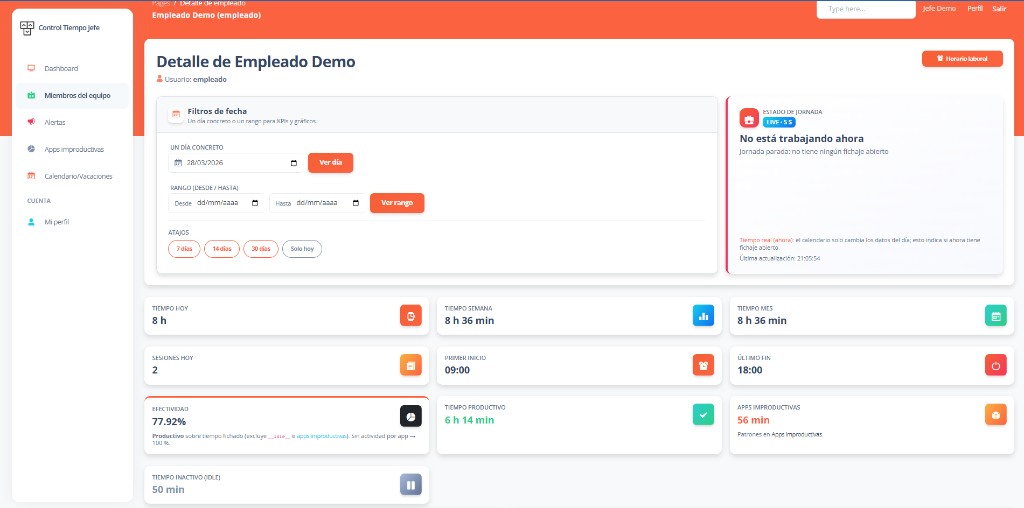
Review the employee, date, start time, finish time and recorded duration. These fields describe the working periods recorded through the Windows client. They do not allocate time to a customer, project or construction site. Compare a few entries with the manager’s dashboard during the trial so the person responsible for reports understands how the information is presented.
Prepare a monthly spreadsheet review
Download the available time records and filter the required month in your spreadsheet. Check that dates are interpreted correctly and durations remain consistent with the source entries. Then investigate missing or unexpected records before sharing the file. If your downstream process expects a particular column order or date format, confirm that mapping explicitly instead of assuming a ready-made integration.
Separate recorded time from payroll and activity
A CSV time record does not automatically calculate statutory overtime, wages or payroll deductions. Application usage and inactivity also answer a different question from start and finish times. Do not infer project costs or performance from duration alone. Your company needs its own review process and any additional information required by the person preparing payroll, accounts or internal reporting.
Test the report your company will actually use
Select a representative employee and reporting period, export the file and ask the intended recipient to review it. Include a period crossing a month boundary or another normal reporting complication. Confirm how dates and times are displayed for your locations, especially across countries. The application interface is currently Spanish; email support is available in English. The 14-day no-card trial lets you evaluate that complete reporting workflow before deciding whether to subscribe.
This teaching example uses fictional records and English column labels. Current product exports use Spanish headers; the table below explains their meaning.
How to read the CSV exported by the application
The translated downloadable examples help explain the columns. The current product export keeps the Spanish headings shown here; an English sample does not mean your company’s export has been translated.
One employee or the whole team: two layouts
- Individual employee download
- The file starts with two identification rows: Empleado and Usuario. After a blank row, the data table begins with Fecha, Hora inicio, Hora fin and Duración (hh:mm:ss).
- Whole-team download
- The first row contains all six headings listed below. Empleado and Usuario identify the employee on every time-record row.
| Heading in the current CSV | Meaning |
|---|---|
| Empleado | The name of the employee the record belongs to. |
| Usuario | The employee’s username; use it to distinguish and filter employees in a whole-team download. |
| Fecha | The recorded start date, in YYYY-MM-DD format. |
| Hora inicio | The recorded start time, in hh:mm:ss format. |
| Hora fin | The finish time, in hh:mm:ss format. This cell is blank while the record is still open. |
| Duración (hh:mm:ss) | The stored or calculated duration of the record. It is not a wage amount or a breakdown of application activity. |
Import the file and prepare the reporting period
The file uses UTF-8 encoding and comma-separated columns. If your spreadsheet does not separate the columns automatically, use its CSV import function. For an individual download, select the heading row after the employee identification rows.
The download includes available records that started within the last four years. It is not a monthly filter or a guarantee that four years of data exist. For a monthly review, filter Fecha and, in a whole-team download, Usuario. Keep a copy of the original CSV before preparing your review.
- What happens if a working-time record is still open when I download the CSV?
- Hora fin is blank. If the record has no stored duration, the application calculates the elapsed time from its start to the download time. Treat that figure as provisional: review and close the record through your company’s process before using it as a completed working period.
Frequently asked questions
- Can I download employee time records for Excel?
- The available export is CSV, which can be opened in a spreadsheet. Check the date interpretation and duration fields, then filter the required reporting month and review the entries.
- Does the application produce an automatic PDF timesheet?
- Automatic PDF timesheet generation is not part of the current advertised workflow. The supported download is CSV; any additional formatting or document preparation is a separate process.
- Can the file be treated as payroll-ready in every country?
- No. Confirm your payroll requirements, field mapping and review procedures. The service exports recorded working time and does not calculate each country’s wage rules, taxes or overtime entitlements.
- Can these records support our timekeeping and timesheet review?
- Use the recorded start, finish and duration to review hours worked with the employee. The CSV export supplies time records; it does not calculate wages, overtime entitlements or payroll. Keep the original export and complete any timesheet checks and payroll decisions in your company’s process.
Explore related needs
Tell us what your team needs to manage
The button opens an email draft. Include your country, team size and work devices so we can assess the fit and setup terms.
Discuss your setup