 Control Laboral App
 · Windows + Web
Time tracking software for employees working on Windows
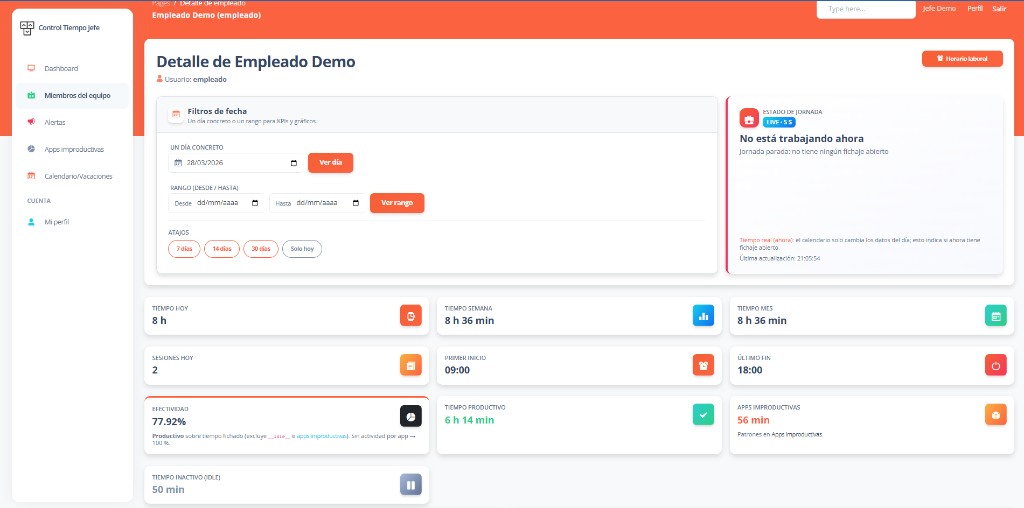
Collect employee working-time records in a shared workflow instead of separate files. Control Laboral App records the working day through a Windows desktop client and gives managers a web dashboard for review. It combines time records, application activity and leave requests. The current application interface is currently Spanish; email support is available in English; this page explains the available features in English.
EUR 4 per employee per month, excluding applicable taxes. 14-day trial without a card.
Email us in English and receive a reply in English. The current application interface is Spanish.
Record the day at the employee’s computer
Employees start and stop their working day in the Windows client. Managers can consult recorded start and finish times and durations. Before rolling out, agree when staff should clock in and out and who will review missing or unexpected entries. A clear daily process matters as much as the tool used to store the records.
Use a shared manager review
The web dashboard lets the responsible manager review employee records and available activity information without collecting a workbook from each person. Export time records as CSV when a spreadsheet review is needed. Test the fields and the relevant reporting period during the trial. The current export is CSV; automatic PDF reports, payroll calculations and project billing are not included.
Keep activity and attendance distinct
Clocked time describes the recorded working period. Application usage and inactivity offer a different view of computer activity during that period. A person may be on a call or reading material away from the keyboard, so inactivity does not establish an absence from work. Use the information to identify questions for review alongside role expectations and the work delivered.
Evaluate one complete workflow before buying
Choose a representative employee and manager, record several working days, export a CSV and submit a leave request. Confirm that Windows and the Spanish interface are suitable for the team. The published subscription is EUR 4 per employee per month, excluding applicable taxes, after a 14-day trial without a card. If your requirements include native mobile clocking, GPS, project allocation or country-specific statutory approval, discuss those requirements before starting.
Frequently asked questions
- Is this a browser-only employee time clock?
- No. The employee clocking workflow uses the Windows desktop client. Managers consult information through the web dashboard. A manager’s browser access does not mean employees can clock in from any device.
- Can I export a monthly employee timesheet?
- You can download recorded time entries as CSV and filter the month in a spreadsheet. Review a sample during the trial to confirm it contains the fields your process requires.
- Does the subscription include English support?
- You can contact us by email in English and receive a reply in English. The current application interface is Spanish; check the Windows and manager workflow during the trial.
Explore related needs
Tell us what your team needs to manage
The button opens an email draft. Include your country, team size and work devices so we can assess the fit and setup terms.
Discuss your setup