 Control Laboral App
 · Windows + Web
Employee clock-in and clock-out from the Windows computer
Give office and remote employees one agreed place to start and finish their recorded working day. Control Laboral App uses a Windows desktop client for employee clocking and a web dashboard for manager review. The resulting records include start time, finish time and duration. The application interface is currently Spanish; email support is available in English.
EUR 4 per employee per month, excluding applicable taxes. 14-day trial without a card.
Email us in English and receive a reply in English. The current application interface is Spanish.
Define when an employee should clock in
Before introducing a time clock, describe the events you want recorded. Agree the start and end of the working day and how people should raise a forgotten or unexpected entry. Make those instructions understandable for your team. The tool stores recorded times, but a consistent company process is still needed to interpret exceptions and avoid inconsistent records.
Review the record from the manager’s dashboard
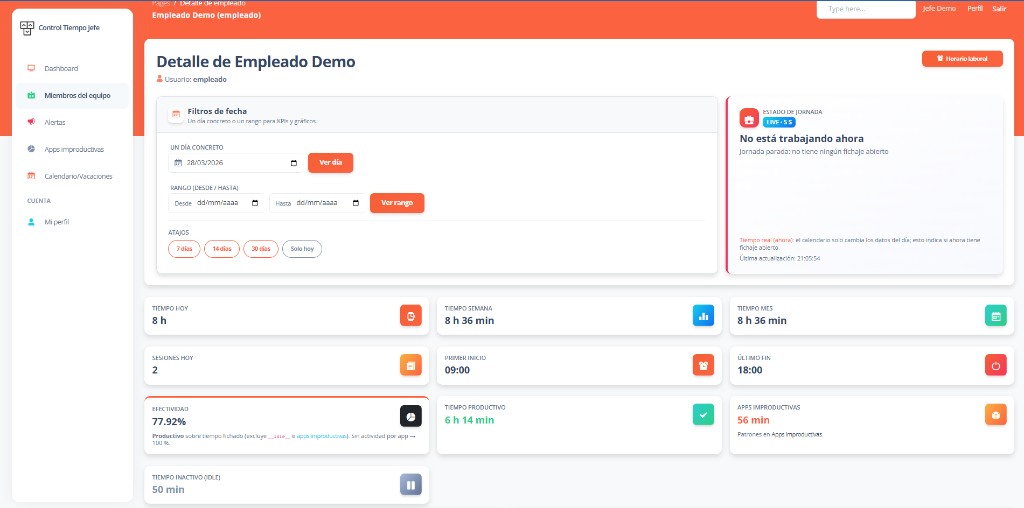
The responsible manager can consult employee time records without collecting individual files. Review a normal day and an unusual one during your pilot so you understand what the dashboard shows. A record of a started work period is not proof that every minute involved active computer use, and application activity is not proof that a particular task was completed.
Prepare a file for monthly administration
Time records can be downloaded as CSV for review in a spreadsheet. Check employee, date, start, finish and recorded duration against your intended reporting process. Filter the required month after downloading and review any entries that need clarification. The service does not automatically calculate wages, payroll overtime rates or the employment rules that apply in each country.
Check the employee devices before rollout
The current employee time clock requires the Windows client. It does not offer native mobile clocking, GPS location validation or biometric attendance terminals. That makes device checks particularly important for mixed office and field teams. Send your country, employee count and equipment details before requesting setup. Evaluate the complete workflow in the 14-day no-card trial; the published subscription is EUR 4 per employee per month, excluding applicable taxes.
Frequently asked questions
- Is this a clock-in system for office employees?
- It can fit office employees who work with Windows and can use the current Spanish interface. Managers review the records online. Confirm the devices and review process with a representative pilot.
- Does clocking in confirm the employee’s physical location?
- No. The current service does not capture GPS coordinates or validate a geographic perimeter. Recorded start and finish times should not be presented as proof that someone was at a specific address.
- Is it also an automatic payroll time clock?
- The service records working time and exports CSV records. It does not calculate payroll, tax, pay rules or statutory overtime entitlements. Check the data your separate payroll process needs before adopting it.
Explore related needs
Tell us what your team needs to manage
The button opens an email draft. Include your country, team size and work devices so we can assess the fit and setup terms.
Discuss your setup