 Control Laboral App
 · Windows + Web
Attendance tracking based on employee working-time records
An attendance question often begins with a basic need: understand which working periods have been recorded and what leave has been requested. Control Laboral App brings those workflows into a manager web dashboard, using the Windows client for employee clocking. Its records describe the time entered through that workflow, rather than certifying physical presence at an address.
EUR 4 per employee per month, excluding applicable taxes. 14-day trial without a card.
Email us in English and receive a reply in English. The current application interface is Spanish.
Use a consistent attendance process
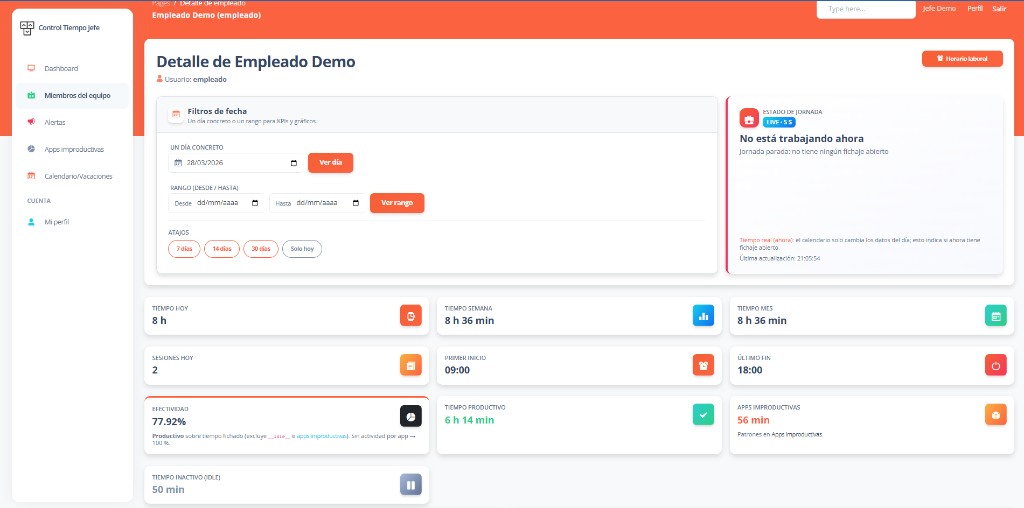
Agree how office, home-working and hybrid employees should start and finish their recorded day. Choose a responsible reviewer and a clear way for staff to raise missing information. Applying the same process across supported Windows workstations makes review easier, but different job roles may still need different explanations. The current application interface is currently Spanish; email support is available in English.
Read attendance alongside leave requests
A missing time entry may have a straightforward explanation such as an approved day off. Employees can submit vacation and day-off requests for manager review, and the team calendar provides a monthly view. Review the relevant request and recorded time together before treating a difference as an attendance issue. Request approval does not automatically calculate payroll adjustments or country-specific leave entitlements.
Avoid confusing presence with computer interaction
Recorded working time, application usage and inactivity answer different questions. Someone may be working away from the keyboard during a call or meeting. Conversely, an application being used does not demonstrate that a required deliverable was completed. Review significant differences with the employee and use the indicators as context for the agreed attendance process, rather than a substitute for management judgment.
Check the evidence you actually need
If your process requires a badge reader, biometric terminal, phone clocking, GPS or a record tied to a specific workplace, those are separate requirements and are not provided by the current version. Time records can be exported as CSV for spreadsheet review. Test that file against your internal process before rollout. The 14-day no-card trial is intended to help you assess the supported workflow and its suitability for your company.
Frequently asked questions
- Does attendance tracking prove someone is at the office?
- No. The current system records employee clocking through Windows. It does not capture GPS, use a workplace access terminal or certify physical presence at a particular office.
- Can remote and office employees use the same process?
- Employees using the supported Windows client can follow the same clocking process in either setting. Confirm devices, language and the interpretation of recorded times during your pilot.
- What happens with an approved day off?
- Managers can review vacation or day-off requests and consult the team calendar. The company still needs its own policy for reviewing attendance exceptions and any effect on payroll or statutory records.
Explore related needs
Tell us what your team needs to manage
The button opens an email draft. Include your country, team size and work devices so we can assess the fit and setup terms.
Discuss your setup